The Tunnel Was Up. The Cameras Were 502.
A singlecloudflared pod was enough to take every Cloudflare-fronted service down with it. Then everything else underneath decided to demonstrate its own version of "almost works" — Tailscale's silent route hijack, coredns forwarding into a black hole, a Frigate pod about to eat its own node.
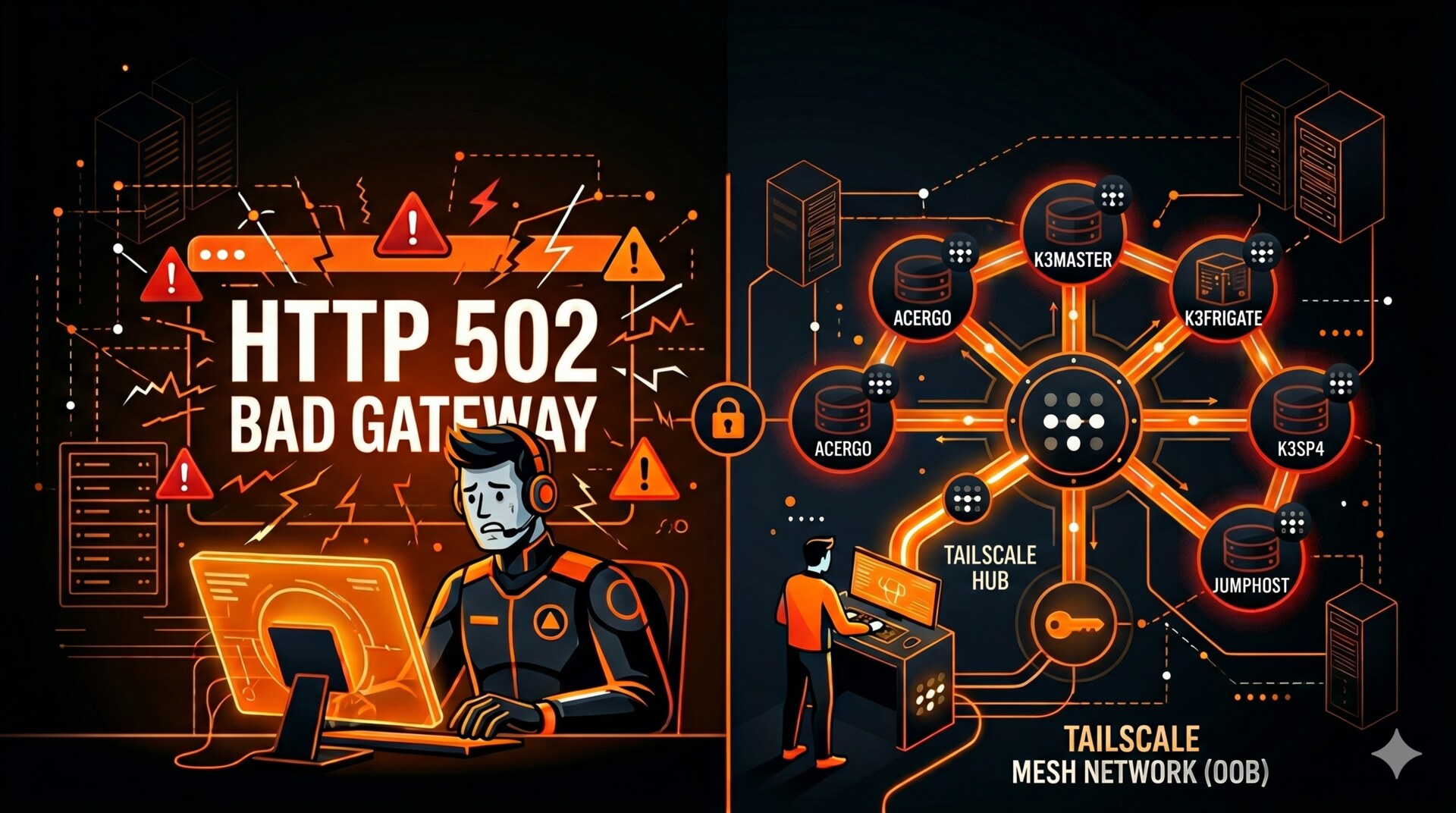
The 502 on the left is what the public saw. The mesh on the right is what I should have had behind it.
The Starting Point
I was away from the house. I went to check the doorbell camera and the page returned 502. Then monitor.ayurforlife.eu did the same. Both hostnames are fronted by a Cloudflare tunnel into my k3s cluster.
So I tried to SSH in to look. The only path I had from the public internet was a router port-forward to a "jumphost" at 192.168.100.62. That box did not answer either.
By the time I got back to the house the cluster had healed itself. Pods Running, hostnames 302-ing through Cloudflare Access, everything looked fine. The honest part of this story is that nothing was fine. The cluster had revealed two single points of failure at the same time, and the only reason it did not stay broken longer was luck.
This post is the fix. Two layers the first afternoon, three more layers the next day, after the network discovered new ways to lie to me.
Architecture Before / After
Before
cloudflaredDeployment in thefrigatenamespace:replicas: 1, pinned tok3mastervianodeSelector: kubernetes.io/hostname: k3master- One connector serving every
*.ayurforlife.euhostname - No
PodDisruptionBudget, no liveness or readiness probes, no resource requests - One "jumphost" at
.62whose only external surface was a router port-forward to its sshd - No out-of-band path into the LAN if either node hiccuped
- Frigate pod with
requests.cpu: 1, no CPU limit,swap = 0on the node - coredns Corefile forwarding upstream queries via
/etc/resolv.conf
After
cloudflaredDeployment:replicas: 3, one pod per control-plane node, enforced (not requested)PodDisruptionBudgetwithminAvailable: 2- Liveness and readiness probes on
/ready:2000 - Tailscale mesh across
.52,.56,.53,.62, and the laptop, with.52and.62both advertising192.168.100.0/24as redundant subnet routers --accept-routes=falseon every node that is itself on the advertised LAN (including the routers)- coredns Corefile forwards to
1.1.1.1 8.8.8.8— hardcoded, not host-derived - Frigate pod capped at 3 CPU / 6 Gi memory; node has
kube-reserved+system-reserved+ 4 GB zram - MagicDNS, so
ssh user@k3masterworks from anywhere
Before:
  internet ──► Cloudflare edge ──► [cloudflared @ k3master only] ──► svc
                                          (one connector, one node)
  me away ──► home router :22 ──► jumphost .62 sshd  (untested, alone)

After:
  internet ──► Cloudflare edge ──► [cloudflared x3: k3master / k3frigate / k3sp4]
                                          (three connectors, same tunnel UUID)
                                          PDB minAvailable: 2
  me away ──► Tailscale ──► tailnet ──► subnet router (.52 OR .62) ──► 192.168.100.0/24
                                          MagicDNS, short names from anywhere
The Almost-Works Trap
Looking at the manifest the first instinct is to say the tunnel was fine. The Cloudflare dashboard shows the tunnel as Healthy. The Deployment exists. The Secret is mounted, the ConfigMap is correct, the pod is 1/1 Running. Production traffic is flowing.
It almost works. Cloudflare named tunnels do support high availability. The credentials are tunnel-scoped, not connector-scoped. Multiple cloudflared processes can connect to the same tunnel ID, and the edge will load-balance across them and survive any one of them disappearing.
And then one node has its moment, and every public hostname returns 502.
The reveal, half an hour into the postmortem: I had run a connector, not a tunnel. The Deployment was replicas: 1. The nodeSelector pinned that one pod to one host. Cloudflare's edge had exactly one healthy connector for the entire tunnel, and when k3master blipped the edge had nowhere to send traffic. The tunnel UUID was up. The connector serving it was not.
Same facts as the dashboard showed. The difference is whether the protocol's HA was actually wired into the Deployment's HA. It was not.
Making cloudflared HA
Problem. A single pod, pinned to a single node, was the public ingress for every Cloudflare-fronted service in the cluster.
Constraint. The cluster has three control-plane nodes on wired ethernet (k3master, k3frigate, k3sp4) and three worker nodes that are OnePlus phones on USB tether (one61, one62, one6t). The USB tether to k3master flaps for tens of seconds at a time whenever the kernel renegotiates the RNDIS link. I do not want a public ingress riding on something that flaps. The HA pool needs to live on the wired CP nodes only.
Decision. Scale to three replicas, one per CP node, with the placement enforced — not preferred — and a PDB that protects against draining more than one at a time.
spec:
  replicas: 3
  strategy:
    type: RollingUpdate
    rollingUpdate:
      maxSurge: 1
      maxUnavailable: 1
  template:
    spec:
      affinity:
        nodeAffinity:
          requiredDuringSchedulingIgnoredDuringExecution:
            nodeSelectorTerms:
            - matchExpressions:
              - key: node-role.kubernetes.io/control-plane
                operator: In
                values: ["true"]
        podAntiAffinity:
          requiredDuringSchedulingIgnoredDuringExecution:
          - topologyKey: kubernetes.io/hostname
            labelSelector:
              matchLabels: { app: cloudflared }
      tolerations:
      - key: node-role.kubernetes.io/control-plane
        operator: Exists
        effect: NoSchedule
      containers:
      - name: cloudflared
        args: ["tunnel", "--metrics", "0.0.0.0:2000",
               "--config", "/etc/cloudflared/config.yaml", "run"]
        livenessProbe:
          httpGet: { path: /ready, port: 2000 }
          initialDelaySeconds: 10
          periodSeconds: 30
        readinessProbe:
          httpGet: { path: /ready, port: 2000 }
          initialDelaySeconds: 5
          periodSeconds: 10
        resources:
          requests: { cpu: 50m,  memory: 64Mi }
          limits:   { cpu: 200m, memory: 128Mi }
Plus a PDB:
apiVersion: policy/v1
kind: PodDisruptionBudget
metadata: { name: cloudflared, namespace: frigate }
spec:
  minAvailable: 2
  selector: { matchLabels: { app: cloudflared } }
Trade-off. Three pods now sit idle most of the time. The cost is roughly 150m CPU and 192Mi memory across the cluster — more or less half a percent of the available capacity. The benefit is that a single node going away can no longer black-hole the public surface. The minAvailable: 2 PDB means a kubectl drain of any one CP node is allowed; a second drain blocks until the first replica reschedules.
After the rollout:
$ kubectl -n frigate get pods -l app=cloudflared -o wide
NAME                           READY   STATUS    NODE
cloudflared-6997fb4449-fcspw   1/1     Running   k3master
cloudflared-6997fb4449-jvpkp   1/1     Running   k3frigate
cloudflared-6997fb4449-xqcc6   1/1     Running   k3sp4

$ kubectl -n frigate get pdb cloudflared
NAME          MIN AVAILABLE   ALLOWED DISRUPTIONS
cloudflared   2               1

$ curl -sI https://cams.ayurforlife.eu | head -1
HTTP/2 302
The 302 is the Cloudflare Access auth redirect. That is healthy — it means the edge reached a connector, which reached the upstream Frigate Service, which returned its login. The Cloudflare side needed zero changes. Same tunnel UUID <TUNNEL-UUID>, same DNS records, same ConfigMap, same Secret. Three connectors registered against one tunnel. The protocol always supported this. The Deployment did not.
Why Phone Workers Are Not in the HA Pool
The obvious next move is replicas: 6 and let one land on each phone worker too. More replicas, more resilience.
In real life the USB tether between a OnePlus 6T and the host laptop drops the link for tens of seconds when the bus renegotiates. If cloudflared rode that link, the connector would flap, the edge would mark it unhealthy, and every flap would briefly send traffic into a black hole while the load balancer rebalanced. The phone workers run jobs that tolerate restarts. Public ingress does not.
So the nodeAffinity is requiredDuringSchedulingIgnoredDuringExecution against the control-plane role label, not a preferred soft hint. Three CP nodes, three replicas, exact mapping. This is not ideal: I lose the option to ride out an outage of all three CP nodes at once. But all three CP nodes failing at once is a quorum loss for etcd anyway, at which point public ingress is the third-most-broken thing.
Tailscale as the Out-Of-Band Plane
Problem. While I was away, my only path back into the LAN was the same internet path the production services rode. If Cloudflare's edge was down, or the home router was down, or the public IP changed — I had nothing.
Constraint. I did not want to run a second Cloudflare tunnel just for sshd on the jumphost. That stacks two failure modes of the same provider into the same recovery path. I want a path that does not share fate with the production ingress.
Decision. Tailscale mesh across k3master, k3frigate, k3sp4, the jumphost, and the laptop. Five nodes. Free Personal tier, SSO. Both k3master and the jumphost advertise 192.168.100.0/24 as approved subnet routers, so either one can carry traffic into the LAN.
From the laptop after tailscale up --accept-routes --accept-dns:
$ tailscale status
100.x.x.10   acer16     ive@   linux   -
100.x.x.20   k3master   ive@   linux   active; offers routes
100.x.x.21   k3frigate  ive@   linux   active
100.x.x.22   k3sp4      ive@   linux   active
100.x.x.23   jumphost   ive@   linux   active; offers routes
And the test that matters — the Frigate web UI lives at 192.168.100.209:5000, a MetalLB VIP that has no public address and no Tailscale IP of its own. Reaching it via a subnet router is the whole point of this layer:
$ tailscale ping 192.168.100.209
pong from k3master (100.x.x.20) via 192.168.100.52:41641 in 3ms
3ms from the laptop to an IP that does not exist on the internet, via a subnet route advertised by k3master. MagicDNS resolves the short names too — ssh user@k3master from a hotel Wi-Fi works the same way it works on the LAN.
Trade-off. Tailscale is a third party. If the coordination server is down, new key exchanges fail (existing peer sessions keep working — that is the design). The phones were deliberately left out: their USB tether links are too intermittent to host a useful node, and a flapping subnet router is worse than no subnet router. Defense in depth costs almost nothing when the layers do not share fate.
What Makes a Jumphost a Jumphost
The box at 192.168.100.62 had been sitting in the rack for 87 days running sshd and Uptime Kuma. I called it a jumphost. It was not a jumphost.
A jumphost is not a jumphost if nothing jumps through it from outside. Its only external surface was a router port-forward to port 22 that I had never tested from outside the LAN. The first time I needed that path it did not work, and I cannot tell you exactly why because I had no second path to diagnose with. Maybe the router rebooted. Maybe .62 had its own moment. Maybe sshd was healthy and the port-forward had been silently dropped at the router. The mystery is the point — without a second path, you do not even get to know what failed.
Now .62 runs tailscaled, advertises the LAN as a subnet router, and is the redundant pair to k3master. The router port-forward is still there as a third path, more or less for sentimental reasons. The layers do not share fate.
The Install That Almost Worked
Tailscale on the homelab nodes was supposed to be a five-minute layer add. It mostly was. Five apt installs, five tailscale ups, a Login URL each, and the mesh came up. tailscale status from the laptop showed every node green. tailscale ping 192.168.100.209 worked. The post above was already half-written.
Twenty-four hours later the cluster ate itself.
The first symptom was the cloudflared replica on k3master going CrashLoopBackOff. Then kubectl get pods -A started looking like a crime scene — ImagePullBackOff here, CrashLoopBackOff there, an Init:ContainerStatusUnknown ghost from a recovery attempt that had not actually recovered. Three different pods, three different nodes, three different stuck states.
The fast-and-wrong reaction was the switch is dying. The slow-and-right one was to read the three logs together:
cloudflared-…fcspw   on k3master   "lookup registry-1.docker.io: Try again"
frigate-exporter     on k3master   "Temporary failure in name resolution"
cloudflared-…jvpkp   on k3frigate  "Couldn't resolve SRV record region1.v2.argotunnel.com
                                    on 10.43.0.10:53: server misbehaving"
Three pods, three different nodes, one missing dependency: external DNS from inside any pod. That number — 10.43.0.10 — is the k3s coredns ClusterIP. The pods were reaching it. coredns was answering. coredns was answering wrong, for everything outside cluster.local.
The reveal lived in the default k3s Corefile:
.:53 {
    ...
    forward . /etc/resolv.conf
}
forward . /etc/resolv.conf tells coredns to forward upstream queries to whatever name servers that file lists. On the host the file lists 127.0.0.53 — the systemd-resolved stub. systemd-resolved was pulled in as a dependency of Tailscale the day before. The host resolves fine because 127.0.0.53 is a real listener in the host's net namespace. From inside the coredns pod, 127.0.0.53 is the pod's own loopback, where nothing is listening at all.
coredns was forwarding into a black hole. Every pod's external DNS was broken. The host was fine because the host could reach 127.0.0.53. The coredns pod could not. That asymmetry is the kind of failure you can stare at for hours.
The fix was one ConfigMap edit:
forward . 1.1.1.1 8.8.8.8
kubectl rollout restart deployment/coredns -n kube-system and external DNS came back in under a minute. There was a separate moment of comedy where the rescheduler picked one of the phone workers for the replacement pod, and the new coredns could not pull its own image because — DNS — but that one was a quick kubectl cordon away from a story.
The Subnet Router That Lost Its Default Route
coredns was downstream of a deeper problem. The host-level DNS on .52 was also broken. getent hosts cloudflare.com from the host itself hung. resolvectl status showed every interface with Current Scopes: none. The [Resolve] section of /etc/systemd/resolved.conf was empty.
.52 had also lost its default route. ip route showed local subnet entries only, no default via …. Pinging 1.1.1.1 returned Network is unreachable. The host could not reach the internet at all — except for traffic that already had a route (LAN peers, Tailscale tunnel destinations).
This is where the cascading-fault pattern earned its name. Every individual symptom looked like its own bug. The switch must be dying. coredns must be broken. .52 must be misconfigured. The shared cause was that the Tailscale install on .52 had left the host's DNS and routing settings in an inconsistent state, and the visible part of "is the network up" stayed green because the mesh kept working. ping 100.x.x.x was fine across all five nodes. The tunnel was the green light on the dashboard. The dashboard was lying.
Fix on .52:
sudo tailscale set --accept-routes=false
sudo ip route add default via 192.168.100.1 dev wan0
# /etc/systemd/resolved.conf:
#   [Resolve]
#   DNS=1.1.1.1 8.8.8.8 192.168.100.1
sudo systemctl restart systemd-resolved
sudo netplan apply
The --accept-routes=false is the rule that should be applied to every node that is itself on the LAN advertised by Tailscale subnet routers. .52 and .62 advertise 192.168.100.0/24. .52, .53, and .56 all sit on that LAN. Without accept-routes=false on those three, the kernel installs 192.168.100.0/24 dev tailscale0, LAN traffic gets pulled into the tunnel, and you have a mesh routing its own peers through DERP instead of the ethernet cable between them. We had set this on .53 and .56 during install. We had not set it on .52 — because surely the router does not need to accept its own routes? The router does, when it is also a peer on the LAN it advertises. That sentence is the entire failure mode.
What "No CPU Limit" Means When the Cameras All Move at Once
While the Tailscale aftermath was being chased, Frigate on k3frigate started crashing the node it ran on. Not the pod — the whole node. kubectl get nodes would briefly show k3frigate NotReady, then the box would come back, then the Frigate pod would restart cleanly. Twice in 48 hours.
Problem. A storm rolled through. Wind moves trees. Eight cameras all detect motion at the same time. Each camera triggers Frigate's detect-and-record path: ffmpeg decode, ONNX inference on the 1050 Ti, recording to disk. All eight, concurrently.
Constraint. The Frigate pod manifest had requests.cpu: 1 and no CPU limit. The node is an i5-6600K — 4 cores, no hyperthreading. Under storm load, Frigate's worker threads absorbed all 4 cores. There was no headroom left for the kubelet heartbeat, the etcd peer, or systemd itself. The node went silent at the CPU layer. No kernel OOM lines because RAM was fine. k3s cold-restarted when systemd noticed the kubelet had not pinged in five minutes.
Decision. Cap the pod at 3 cores. Reserve the fourth, explicitly, for the OS and kubelet.
resources:
  requests:
    cpu: "1"
    memory: 4Gi
    nvidia.com/gpu: 1
  limits:
    cpu: "3"
    memory: 6Gi
    nvidia.com/gpu: 1
And on k3frigate's kubelet:
kubelet-arg:
  - "kube-reserved=cpu=500m,memory=512Mi"
  - "system-reserved=cpu=250m,memory=256Mi"
  - "eviction-hard=memory.available<200Mi,nodefs.available<10%"
Plus 4 GB of zram (zstd, priority 100) on the node — the kernel had been running with swap = 0, which means no compression-backed pressure relief either.
The Frigate config itself had two free wins. cam21 and cam22 were running detect at 1280×720. The model inference is 320×320. Anything past 640×360 on the input stream is wasted decode and resize. Dropped both to 640×360. cam19 had a single RTSP input used for both detect and record, which forces an internal decode-and-re-encode cycle inside Frigate; splitting that to a separate cam19_sub for detect saves the encode entirely.
Trade-off. The pod can no longer use the full machine even when the machine is idle. In exchange, the machine can no longer be deprived of itself by its own pod.
Design Decisions
The non-obvious choices, listed:
- PDB
minAvailable: 2, not1. With three replicas,minAvailable: 1would permit two simultaneous drains. Two nodes down means one connector left, and one connector is exactly the configuration that got me into this mess. nodeAffinityrequires control-plane role, not preferred. A hard guarantee that no replica lands on a phone worker. A flapping connector is worse than a missing one.- Both Tailscale and Cloudflare, not either/or. Cloudflare carries the production hostnames. Tailscale carries me. Same LAN, two planes, two providers, two failure modes.
- Two subnet routers, not one.
k3masterandjumphostboth advertise192.168.100.0/24. Either alone is enough. Together they survive each other. --accept-routes=falseon every LAN-resident node, including the subnet routers themselves. Subnet routers advertising the LAN they sit on must not accept the route back. The router does, because it is also a peer on the LAN it advertises.- coredns upstream is hardcoded, not
/etc/resolv.conf-derived.forward . 1.1.1.1 8.8.8.8bypasses the host's stub resolver entirely. The host's resolver works because it has access to127.0.0.53in its own netns. The pod's resolver does not. The simpler primitive wins. - Hard CPU limits on Frigate, not soft requests. A pod with no limit can starve the kubelet. Eviction cannot help if the kubelet is not running to evict.
- zram instead of disk swap on
k3frigate. The disk is recordings-only; adding swap there would mix latencies. Compressed RAM costs about a quarter of itself in overhead but never competes with Frigate I/O. - Phones excluded from the mesh. Adding three intermittent nodes to a five-node tailnet would not improve coverage and would generate noise. Some things do not need HA.
- Same tunnel UUID, not a new one. Re-using
<TUNNEL-UUID>means zero changes on the Cloudflare side. The fix is purely on the Deployment side, which is where the bug lived.
Things That Went Wrong
The Helm apt repo blocked apt update on the jumphost. Installing tailscaled on .62 failed because apt update itself errored out on a malformed signature from baltocdn.com/helm/stable/debian — Clearsigned file isn't valid, got 'NOSPLIT'. The Helm repo had not been touched in months and broke on its own. Workaround: moved /etc/apt/sources.list.d/helm-stable-debian.list aside, ran the Tailscale installer, restored the file. The proper fix — refresh the keyring or migrate to OCI Helm — is queued.
coredns rescheduled itself onto a phone worker during the DNS fix. I bounced the coredns deployment to pick up the new Corefile. The scheduler picked one6t for the replacement pod. one6t did not have the coredns image cached. To pull it, kubelet had to resolve registry-1.docker.io. To resolve that, the pod needed coredns — which was the pod that had just been deleted. Deadlock until I cordoned the three phone nodes and the scheduler picked a CP node where the image already lived. The cluster's own scheduling can deadlock on its own broken DNS. System-critical pods belong on nodes that always have their images.
The Frigate hostPath and the git ConfigMap had silently drifted by weeks. Frigate runs with a config-sync sidecar that watches /mnt/frigate/config/config.yml on the host and writes changes back to the cluster's ConfigMap. The git-tracked configmap.yaml is a downstream backup, not the source. The git copy was missing cam21 and cam22 entirely — added through the Frigate UI weeks ago and never resynced. The hostPath is the source of truth, the ConfigMap is the snapshot, the git file is the snapshot's last commit. Renaming the file in the repo to reflect that.
Cluster-internal LAN connectivity was the misleading symptom. Early in the diagnosis I noticed ssh user@192.168.100.62 from .52 timed out while the Tailscale IPs of both nodes responded immediately. That looked like a switch fault. It was not. It was .52 accepting its own advertised subnet route over Tailscale because --accept-routes=false had never been applied to .52 itself. Every LAN-to-LAN packet on that node was being shovelled into the tunnel and DERP-relayed back out. The Tailscale layer was working hard to mask a problem that was, in fact, the Tailscale layer.
Impact
Numbers, before and after:
- Cloudflare-fronted tunnel connectors: 1 → 3 (n-1 tolerance)
- PodDisruptionBudget allowed voluntary disruptions: undefined → 1
cloudflaredresource floor: 0 / 0 → 150m CPU / 192Mi RAM across the cluster (~0.5% of total)- Admin paths from outside the LAN: 1 (router port-forward, untested) → 2 subnet routers + 1 port-forward
- Tailscale RTT from laptop to LAN-only Frigate VIP: 3 ms
- Frigate pod CPU limit: undefined → 3 cores (1 core reserved for OS + kubelet)
- Frigate pod memory: requests 1 Gi → 4 Gi, limits 3 Gi → 6 Gi
k3frigatekubelet reservations: undefined → 750m CPU / 768Mi RAM combinedk3frigateswap: 0 → 4 GB zram (zstd, priority 100)- Frigate detect resolution on
cam21/cam22: 1280×720 → 640×360 - External DNS from inside a pod:
Try again(resolver-level timeout) → instant resolve - Default route on
.52: missing →via 192.168.100.1 - Full-node lockup events on
k3frigate: 2 in 48 h → 0 since hardening - Single-node-blip blast radius on public ingress: total outage → zero
The Payoff
The artefact is three connectors where there used to be one, a tailnet where there used to be a port-forward, a Frigate pod that no longer eats its node, and a coredns that can resolve the internet again. None of these are exotic. None of them needed new hardware.
The skill that runs through all of them is reading symptoms together rather than chasing each one alone. Cloudflare's protocol supported HA. My Deployment did not. Tailscale's tunnel was up. The host's DNS was empty. Frigate's pod was running. The node it ran on was about to lock up. Each layer was claiming "fine" against a different definition of fine, and the gap between those definitions is where outages live.
High availability stops being a feature you add — and becomes the absence of the habit of trusting your own dashboards.
Cluster Context
| Node | Role | Hardware | LAN IP | OS |
|---|---|---|---|---|
| k3master | control-plane / etcd | mini PC, Intel i5-1035G1 | 192.168.100.52 | Ubuntu 24.04 LTS |
| k3frigate | control-plane / etcd | mini-ITX, Intel i5-6600K, GeForce GTX 1050 Ti | 192.168.100.56 | Ubuntu 24.04 LTS |
| k3sp4 | control-plane / etcd | Surface Pro 4, Intel i5-6300U | 192.168.100.53 | Ubuntu 24.04 LTS (surface kernel) |
| one61 | worker (arm64) | OnePlus 6, Adreno 630 | USB tether to .52 | postmarketOS |
| one62 | worker (arm64) | OnePlus 6, Adreno 630 | USB tether to .52 | postmarketOS |
| one6t | worker (arm64) | OnePlus 6T, Adreno 630 | USB tether to .52 | postmarketOS |
| jumphost | OOB / subnet router | mini PC, x86_64 | 192.168.100.62 | Debian 13 (trixie) |
| laptop | workstation | Acer 16, x86_64 | DHCP | Fedora 44 |
k3s v1.35.0+k3s3, etcd HA across the three control-plane nodes, MetalLB L2 pool on 192.168.100.200–230. GPU inference for the chickenCoop pipeline runs on the OnePlus workers via Adreno OpenCL — separate post.
Manifests:
homelab-config/apps/cloudflared/— HA Deployment, PDB, ConfigMap templatehomelab-config/network/— Tailscale subnet router notes,--accept-routes=falserule, coredns Corefile patch,.52systemd-resolved + netplan entrieshomelab-config/apps/frigate/— pod resource limits,k3frigatekubelet args, zram config, Frigateconfig.ymlsnippets
Previous: · Frigate NVR Migration on k3s · Three Phones, One Switchless Cluster